
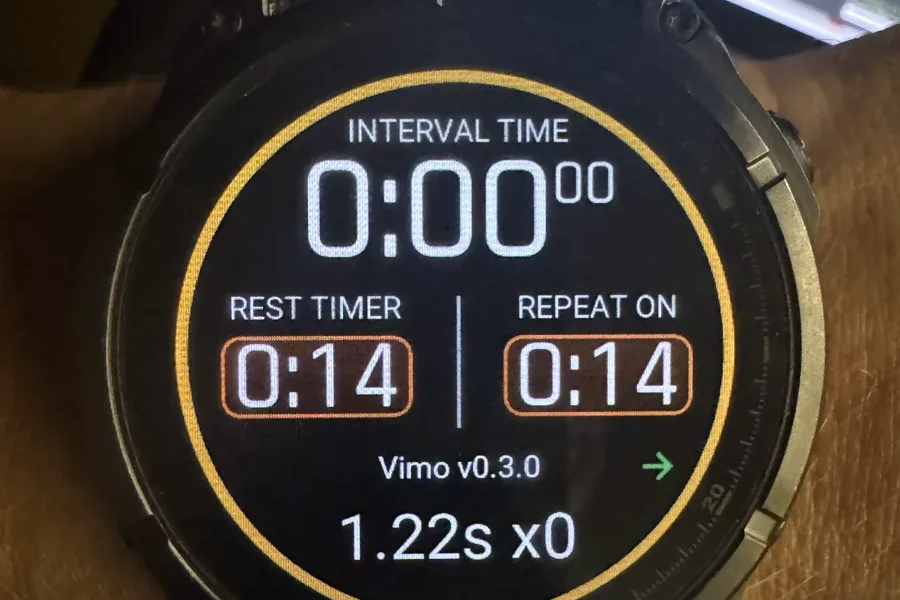
Recording Your Vimo Tempo in Garmin, with FIT Developer Fields
Garmin swim profiles ignore external cadence sensors, so until now your Vimo tempo could not be recorded in a swim activity at all. The new Vimo Swim Field writes it straight into the FIT file.
Your Garmin knows almost everything about the swim you just finished. Splits, stroke count, stroke rate, rest, SWOLF. It does not know the one number the whole session was built around: the tempo you were actually swimming to.
That is not an oversight on your part. Garmin's swim profiles do not take data from external cadence sensors, so a tempo trainer has nowhere to put its number. Your Vimo beeps in your cap, you hold the rhythm, and the moment you hit stop the tempo is gone. It never reaches the file.
The Vimo Swim Field, a Connect IQ data field, closes that gap. It connects to your Vimo over Bluetooth during the activity and writes the tempo into the FIT file itself.
On the watch, while you swim
The field sits on your swim data screen alongside pace and distance and shows two things live: the tempo your Vimo is currently playing, and a counter of lap cues delivered so far. No extra screen to swipe to, no phone at the pool deck. Glance at the wrist at the wall and you can see what the device is doing.
After the swim, in Garmin Connect
This is the part that did not exist before. Once the activity syncs, three things are waiting under it:
- a per-second tempo trace for the whole session,
- a per-lap average tempo,
- the session lap-cue count.
They are FIT developer fields, which means Garmin Connect renders them as charts under the activity, next to the native ones. You can put your tempo trace and your stroke rate on the same timeline and see where the two came apart, which is usually the interesting bit.
Why developer fields are the right place for this
FIT is not a fixed schema. The protocol deliberately reserves room for data its authors never anticipated, and that room is where this lives.
A Connect IQ app declares a developer data ID tied to its own UUID, then a field description for each field it wants to write: a name, units, a base type, and which message the values attach to. From that point on the app can append its own values to standard FIT messages, right beside Garmin's. Per-second tempo rides along on record messages, average tempo on lap, the lap-cue count on session.
The result is a normal FIT file. Nothing is bolted on afterwards, nothing lives in a separate export you have to correlate by hand. The tempo syncs with the activity, charts itself in Garmin Connect, and reaches anything downstream that can read a FIT file. It is a first-class channel in your training history rather than a note in the activity description.
If you have read how we stitched a split Garmin ride back together, this is the same ecosystem seen from the other end: that story was about repairing FIT files after the fact, this one is about putting the right data in them while you swim.
One button for both devices
There is a second thing the data field gets you, and in the water it may matter more than the charts.
Starting the activity on your watch starts the program on the Vimo. Stopping the activity stops it. One button press runs both devices, so you are not standing at the wall pressing start twice, and the watch timeline and the tempo program begin at the same instant by construction rather than by luck.
Works with every program, including Combo
The field records whatever your Vimo is playing. That includes the new Combo program, which runs a stroke tempo and a lap cue at the same time, and it is exactly why the lap-cue counter is a separate channel: in Combo the cues are not derived from the tempo, they are their own layer of information, and they deserve their own line in the file.
Where it runs today
Honest status: the field runs on the fenix 7 and fenix 8 families for now, with more models coming. It is not in the Connect IQ store yet. It is in beta testing.
If you swim with a fenix and want to be part of the testing, reserve your Vimo and then drop us a message with the watch model you swim with. For the remote-control side of the ecosystem, the Vimo Swim app for Garmin is a separate Connect IQ app and works today.
A tempo trainer that leaves no trace in your training log is a coach who never writes anything down. This is us finally handing you the notebook.
Twelve Swimmers, One Tempo: Running a Whole Squad from One Screen
Handing out tempo trainers to a group used to mean setting every device by hand. With Vimo Coach you set the tempo once and the whole lane follows. A plain-language look at what changes on the pool deck.
What World Aquatics Is, and Why a Tempo Trainer Cannot Race With You
World Aquatics decides what a swimmer may wear in a race. Thirteen devices are on its approved list, and no tempo trainer from any brand is among them. Here is who writes that rule, what it says word for word, and why it makes sense.